
网络安全审计工具-Nmap
 2012-05-28 12:24:53
  阿炯
阿炯
 Nmap是一个网络连接端扫描软件,用来扫描网上电脑开放的网络连接端。确定哪服务运行在那些连接端,并且推断哪个操作系统计算机运行(这是亦称 fingerprinting)。它是网络管理员必用的软件之一,以及用以评估网络系统的安全。是一个网络扫描器,用于通过发送数据包和分析响应来发现计算机网络上的主机和服务。
Nmap提供许多探测计算机网络的功能,包括主机发现和服务及操作系统检测。这些功能可以通过脚本扩展,提供更高级的服务检测、漏洞检测和其他功能;可以在扫描过程中适应网络条件,包括延迟和拥堵。它最开始是一个 Linux 工具,后来被移植到 Windows、macOS 和 BSD。采用C语言开发并在GPL协议下授权。

Nmap ("Network Mapper") is a free and open source (license) utility for network discovery and security auditing. Many systems and network administrators also find it useful for tasks such as network inventory, managing service upgrade schedules, and monitoring host or service uptime. Nmap uses raw IP packets in novel ways to determine what hosts are available on the network, what services (application name and version) those hosts are offering, what operating systems (and OS versions) they are running, what type of packet filters/firewalls are in use, and dozens of other characteristics. It was designed to rapidly scan large networks, but works fine against single hosts. Nmap runs on all major computer operating systems, and official binary packages are available for Linux, Windows, and Mac OS X. In addition to the classic command-line Nmap executable, the Nmap suite includes an advanced GUI and results viewer (Zenmap), a flexible data transfer, redirection, and debugging tool (Ncat), a utility for comparing scan results (Ndiff), and a packet generation and response analysis tool (Nping).
特点
Flexible: Supports dozens of advanced techniques for mapping out networks filled with IP filters, firewalls, routers, and other obstacles. This includes many port scanning mechanisms (both TCP & UDP), OS detection, version detection, ping sweeps, and more. See the documentation page.
Powerful: Nmap has been used to scan huge networks of literally hundreds of thousands of machines.
Portable: Most operating systems are supported, including Linux, Microsoft Windows, FreeBSD, OpenBSD, Solaris, IRIX, Mac OS X, HP-UX, NetBSD, Sun OS, Amiga, and more.
Easy: While Nmap offers a rich set of advanced features for power users, you can start out as simply as "nmap -v -A targethost". Both traditional command line and graphical (GUI) versions are available to suit your preference. Binaries are available for those who do not wish to compile Nmap from source.
Free: The primary goals of the Nmap Project is to help make the Internet a little more secure and to provide administrators/auditors/hackers with an advanced tool for exploring their networks. Nmap is available for free download, and also comes with full source code that you may modify and redistribute under the terms of the license.
Well Documented: Significant effort has been put into comprehensive and up-to-date man pages, whitepapers, tutorials, and even a whole book! Find them in multiple languages here.
Supported: While Nmap comes with no warranty, it is well supported by a vibrant community of developers and users. Most of this interaction occurs on the Nmap mailing lists. Most bug reports and questions should be sent to the nmap-dev list, but only after you read the guidelines. We recommend that all users subscribe to the low-traffic nmap-hackers announcement list. You can also find Nmap on Facebook and Twitter. For real-time chat, join the #nmap channel on Freenode or EFNet.
Acclaimed: Nmap has won numerous awards, including "Information Security Product of the Year" by Linux Journal, Info World and Codetalker Digest. It has been featured in hundreds of magazine articles, several movies, dozens of books, and one comic book series. Visit the press page for further details.
Popular: Thousands of people download Nmap every day, and it is included with many operating systems (Redhat Linux, Debian Linux, Gentoo, FreeBSD, OpenBSD, etc). It is among the top ten (out of 30,000) programs at the Freshmeat.Net repository. This is important because it lends Nmap its vibrant development and user support communities.
正如大多数工具被用于网络安全的工具,nmap 也是不少黑客及骇客爱用的工具 。系统管理员可以利用nmap来探测工作环境中未经批准使用的服务器,但是黑客会利用nmap来搜集目标电脑的网络设定,从而计划攻击的方法。
Nmap 常被跟评估系统漏洞软件Nessus 混为一谈。Nmap 以隐秘的手法,避开闯入检测系统的监视,并尽可能不影响目标系统的日常操作。
NMap的图形用户界面-Zenmap
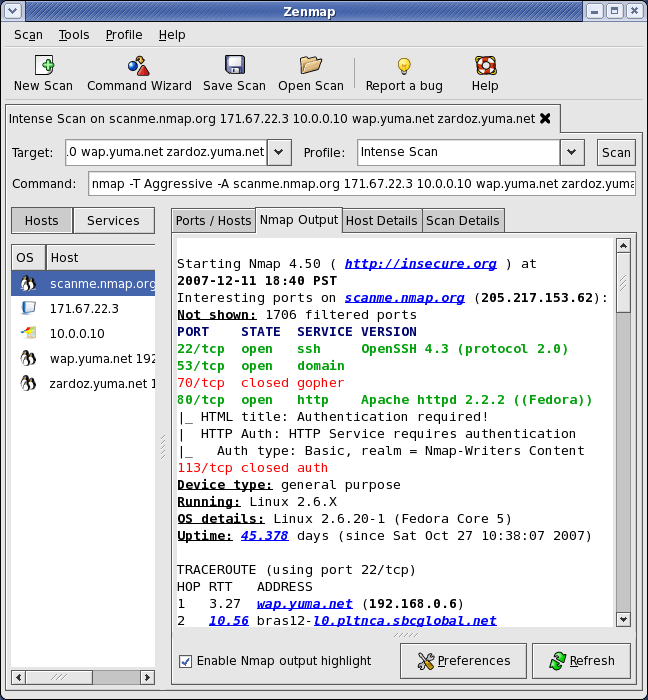
ZenMap是安全扫描工具NMap的一个官方的图形用户界面,是一个跨平台的开源应用,不仅初学者容易使用,同时为高级使用者提供了很多高级特性。持续的扫描能够被存储,进行重复运行。命令行工具提供了直接与NMap的交互操作。扫描结果能够被存储便于事后 查阅。存储的扫描可以被比较以辨别其异同。最近的扫描结果能够存储在一个可搜索的数据库中。
最新版本:7.8
该版本包含上百项改进,近 1000 个信的 OS 和服务检测指纹,利用新的 kqueue 和 poll I/O 引擎实现了性能的提升,更好的 IPv6 traceroute 支持,改进对 Windows 8 的支持等。
[Windows]Npcap Windows 数据包捕获库比以往任何时候都更快更稳定
[NSE]增加了 11 个 NSE 脚本
在 Nmap 中使用 pcap_create 代替 pcap_live_open,并在 pcap Descriptor 上设置即时模式,这解决了 Linux 上的丢包问题,并提高了其他平台上的性能。
将用于字符串处理的实用程序函数收集到一个新的库 stringaux.lua 中
新的库 Oops.lua 使报告错误更容易,需要时提供大量的调试细节
收集工具函数,用于操作表并将表搜索到一个新的库 tableaux.lua 中
knx.lua 库有与 KNX/KonNEX 设备通信的通用功能和定义
HTTP 库提供了对 gzip 编码响应体的透明支持
向 Nsock 和 NCAT 添加 AF_VSOCK(LinuxVM 套接字)功能,VM 套接字用于虚拟机与管理程序之间的通信
减少了 LibPCRE 资源限制
最新版本:7.9
Nmap 7.92 现已于2021年8月上旬发布,此次更新包括数十个优化、加强和 bug 修复。主要更新内容如下:
将 Npcap(Windows 原始数据包捕获和传输驱动程序)从 1.00 版升级到最新的 1.50 版
由于 Npcap 1.50 升级,Nmap 现在可以在 Windows ARM 架构上运行
将 Windows 版本要求更新为 Visual Studio 2019、Windows 10 SDK 和 UCRT
新的 Nmap 选项:unique 将防止 Nmap 扫描同一个 IP 地址两次,当不同的名称解析为相同的地址时会发生这种情况
TLS 1.3 现在被大多数与其相关的脚本支持,例如 ssl-enum-ciphers。某些功能(如 ssl 隧道连接和证书解析)需要 OpenSSL 1.1.1 或更高版本才能完全支持
添加了 3 个 NSE 脚本,使总数达到 604 个
将 OpenSSL 升级到版本 1.1.1k。这解决了一些不会以实质性方式影响 Nmap 的 CVE
如果 excludefile 列出的 CIDR 范围包含较早的较小 CIDR 范围,则该地址集匹配中会排除所有目标
防止 ssl-* NSE 脚本探测从版本扫描中排除的端口,通常是 9100-9107,因为 JetDirect 将打印发送到这些端口的任何内容
当无法找到到目标的可用路由时,Nmap 不再产生 “无法将源地址转换为表示格式” 的消息
如果连接数超过 FD_SETSIZE,则使用 FD_* 宏的安全检查版本提前中止
通过 SOCKS4/SOCKS5 代理的连接,在连接建立后会间歇性地丢掉服务器发送的数据
更多详情请查看更新公告。
Nmap 7.93 正式于2022年9月上旬发布,更新内容如下:
这个版本是为了纪念 Nmap 的 25 周年,这一切都始于 Fyodor 在 1997 年 9 月 1 日的这篇文章。
将 Npcap 从 1.50 版本升级到最新的 1.71 版本,它包括几十个性能改进、错误修复和功能增强
确保 Nmap 用 OpenSSL 3.0 构建
升级包含的库:libssh2 1.10.0、zlib 1.2.12、Lua 5.3.6、libpcap 1.10.1
修复一个错误,即当没有配置 IPv4 地址时,Nmap 无法在 Linux 上发现接口
更新 Nmap 输出 DTD,以便与实际输出相匹配,因为 Nmap 7.90 中增加了 <hosthint> 元素
修复 newtargets 支持:自 Nmap 7.92 以来,脚本不能在脚本预扫描阶段添加目标
脚本 dhcp-discover 和 broadcast-dhcp-discover 现在支持设置一个客户端标识符
脚本 oracle-tns-version 对于 Oracle 19c 或更新的版本没有正确报告
脚本 redis-info 崩溃或产生不准确的客户端连接和 / 或集群节点信息
Nmap 和 Nping 无法在 FreeBSD 上获得系统路由
脚本 ipidseq 由于调用一个不可达的库函数而被破坏
如果 Nmap 在自定义位置用 OpenSSL 编译,则不能正确启用对 EC 加密的支持
停止了创建 Nmap win32 二进制压缩文件
修复 mssql.lua 的 TDS7 密码编码
用更新的标识符替换 IIS 的废弃 CPE
修复遇到未知 BSON 数据类型时的 script-terminating 错误,增加了大多数标准数据类型的解析器
修复主机名 / 证书比较和匹配,以处理没有空终止符的 ASN.1 字符串
增加了对 SOCKS5 代理的支持,该代理将绑定的地址作为主机名返回,而不是 IPv4/IPv6 地址
官方主页:http://nmap.org/
该文章最后由 阿炯 于 2022-09-06 12:36:30 更新,目前是第 2 版。