
开源数据压缩工具-NanaZip
 2026-02-24 18:13:17
  阿炯
阿炯
 系 7-Zip 的衍生产品,带来现代 Windows 体验。采用C & C++语言编写开发并在MIT许可证协议授权使用。
NanaZip is an open source file archiver intended for the modern Windows experience, forked from the source code of well-known open source file archiver 7-Zip.

NanaZip 是一个正在开发中的项目,该应用程序的路线图计划进一步使UI现代化,以使用 WIndows 11 风格的控件,并提供对 Mica 以及明暗模式的完全支持。它通过 MSIX 打包,完美集成 Windows 11 的资源管理器右键菜单,具备更好的现代系统体验,并支持更多压缩编解码器,提供 7-Zip 的高效压缩能力。
支持的操作系统:Windows 10 版本 1809 或更高版本
支持的平台:x86、x86-64(AMD64) 和 ARM64。
产品特点
继承 7-Zip 21.07 的所有功能。
使用 MSIX 打包以获得现代部署体验。
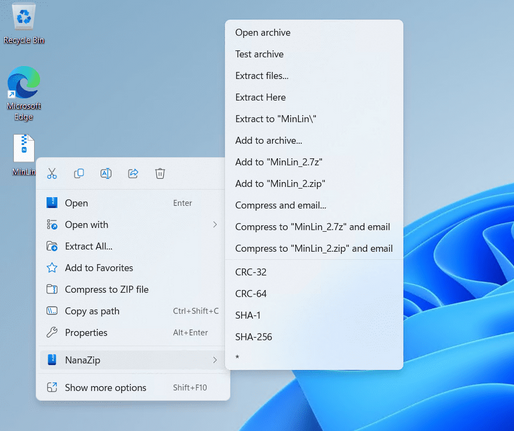
支持 Windows 10/11 文件资源管理器中的上下文菜单。
为 NSIS 档案启用 NSIS 脚本反编译支持(从 7-Zip NSIS 分支合并。)
提供 7-Zip 执行别名,帮助用户迁移到 NanaZip。
支持 Brotli、Fast-LZMA2、Lizard、LZ4、LZ5 和 Zstandard 编解码器(从 7-Zip ZS 分支合并。)
支持所有 GUI 组件的 Per-Monitor DPI-Aware。
支持 i18n for GUI 版本的自解压可执行文件。
Inherit all features from 7-Zip 26.00, 7-Zip ZS and 7-Zip NSIS.
Support the dark mode for all GUI components.
Support the Mica effect on the main window. You will enjoy the full window immersive Mica for all GUI components if you are using dark mode with HDR disabled.
Packaging with MSIX for modern deployment experience.
Support the context menu in Windows 10/11 File Explorer.
Provide 7-Zip execution alias for helping users to migrate to NanaZip.
Support the Per-Monitor DPI-Aware for all GUI components.
Support the i18n for GUI edition of Self Extracting Executable.
Modernize message boxes and folder browsers.
Provide the Smart Extraction feature.
Provide the Open folder after extraction option.
Provide the policy mechanism for enforcing settings (see Policies.md for details)
Propagates Mark-of-the-Web to all files by default.
Provide additional hash algorithms:
MD2 (Inherit from 7-Zip ZS, but reimplemented with Windows CNG API)
MD4 (Inherit from 7-Zip ZS, but reimplemented with Windows CNG API)
MD5 (Inherit from 7-Zip, but reimplemented with Windows CNG API)
SHA-1 (Inherit from 7-Zip, but reimplemented with Windows CNG API)
SHA-256 (Inherit from 7-Zip, but reimplemented with Windows CNG API)
SHA-384 (Inherit from 7-Zip, but reimplemented with Windows CNG API)
SHA-512 (Inherit from 7-Zip, but reimplemented with Windows CNG API)
ED2K (Implemented with Windows CNG API)
AICH (Implemented with RHash)
BLAKE2b (Implemented with RHash)
BTIH (Implemented with RHash)
EDON-R 224 (Implemented with RHash)
EDON-R 256 (Implemented with RHash)
EDON-R 384 (Implemented with RHash)
EDON-R 512 (Implemented with RHash)
GOST R 34.11-94 (Implemented with RHash)
GOST R 34.11-94 CryptoPro (Implemented with RHash)
GOST R 34.11-2012 256 (Implemented with RHash)
GOST R 34.11-2012 512 (Implemented with RHash)
HAS-160 (Implemented with RHash)
RIPEMD-160 (Implemented with RHash)
SHA-224 (Implemented with RHash)
SHA3-224 (Inherit from 7-Zip, but reimplemented with RHash)
SHA3-256 (Inherit from 7-Zip, but reimplemented with RHash)
SHA3-384 (Inherit from 7-Zip, but reimplemented with RHash)
SHA3-512 (Inherit from 7-Zip, but reimplemented with RHash)
Snefru-128 (Implemented with RHash)
Snefru-256 (Implemented with RHash)
Tiger (Implemented with RHash)
Tiger2 (Implemented with RHash)
BTIH (Implemented with RHash)
TTH (Implemented with RHash)
Whirlpool (Implemented with RHash)
XXH32 (Implemented with xxHash)
XXH64 (Implemented with xxHash)
XXH3_64bits (Implemented with xxHash)
XXH3_128bits (Implemented with xxHash)
SM3 (Implemented with GmSSL)
Provide additional codecs. (Note: Decoder can be considered as decompression support, Encoder can be considered as compression support, and Archiver can be considered as archive format support)
Brotli (Decoder & Encoder & Archiver, inherited from 7-Zip ZS)
Fast-LZMA2 (Encoder, inherited from 7-Zip ZS)
Lizard (Decoder & Encoder & Archiver, inherited from 7-Zip ZS)
LZ4 (Decoder & Encoder & Archiver, inherited from 7-Zip ZS)
LZ5 (Decoder & Encoder & Archiver, Both inherited from 7-Zip ZS)
Zstandard (Decoder inherited from 7-Zip, Encoder & Archiver inherited from 7-Zip ZS)
NSIS (Decoder's NSIS script decompiling support, inherited from 7-Zip NSIS)
UFS/UFS2 file system image (Archiver, read-only, both big and little endian)
.NET Single File Application bundle (Archiver, read-only, extracting compressed files in the bundle are not supported)
Electron Archive (asar) (Archiver, read-only)
ROMFS file system image (Archiver, read-only)
ZealFS file system image (Archiver, read-only)
WebAssembly (WASM) binary file (Archiver, read-only)
littlefs file system image (Work In Progress) (Archiver, only block information can acquired)
Provide additional security mitigations:
Enable Control Flow Guard (CFG) to all target binaries for mitigating ROP attacks.
Mark all x86 and x64 target binaries as compatible with Control-flow Enforcement Technology (CET) Shadow Stack.
Strict handle checks at runtime to block the use of invalid handles.
Disable dynamic code generation in Release builds prevents generating malicious code at runtime.
Block loading unexpected libraries from remote sources at runtime.
Enable Package Integrity Check.
Enable EH Continuation Metadata.
Enable Signed Returns.
Enable disabling child process creation for NanaZip CLI and Self Extracting Executables. (Except installer mode of Self Extracting Executables, which compiled binaries is not provided in the NanaZip MSIX package.)
Various UI bug fixes and enhancements.
最新版本:6.0
Supported Operating Systems:
Windows 10, version 2004 (Build 19041) or later
Windows Server 2022 (Build 20348) or later
Supported Platforms:x86 (64-bit),ARM (64-bit)
v6.0.1632于2026年2月中旬发布。本次更新带来了大量的用户界面改进、功能增强以及底层架构调整,标志着项目向社区驱动开发模式的全面过渡。在 UI 方面,v6.0 完成了显著的现代化改造,主要引入了基于 XAML 的地址栏、状态栏、属性信息对话框以及进度对话框,整体界面更为流畅,并改善了深色模式下的文本对比度。此外,设置界面中新增了“解压后打开”功能开关,用户若希望临时禁用此行为,可在打开文件时按住 Shift 键;若需永久关闭,则可在“设置-集成”选项卡底部进行调整。
功能层面,本次更新亮点颇多。v6.0 新增了对 CBR、CBZ 及 ASAR 文件格式的关联支持,并允许用户关联更多文件类型。为提升安全性,新版引入了针对 MoTW 强制策略的注册表设置,并允许通过注册表禁用安全缓解策略以辅助调试。同时,项目组还提供了组策略管理模板(ADMX / ADML),方便企业环境统一配置。命令行界面也得到同步更新,确保与最新的 7-Zip 主线及 7-Zip ZS 实现保持一致。
在系统要求方面,自 6.0 版本起,NanaZip 的最低运行环境提升至 Win10 2004 版(Build 19041)以及 Windows Server 2022(Build 20348)版本。平台方面,官方将继续支持 64 位 x86 和 ARM64 架构,但已移除对所有组件的 x86(32 位)支持。其中自解压可执行文件(SFX)已迁移至 64 位,这使得用户能够在 64 位的微软官方 Win PE 和 Win RE 环境中使用该功能。对于 ARM64 版 Windows 10 用户,开发团队建议升级至 Windows 11,以获得更好的 x64 仿真支持。
另外其项目治理结构也迎来了重大变化。自 6.0 版本开始,NanaZip 采用多位“终身仁慈独裁者”共同决策的模式,通过线下达成一致意见的方式做出最终决定。此举旨在避免单一决策点带来的风险,同时保持相对于大型委员会的高效运作。项目还正式引入了贡献指南和安全策略文档,并开始提供官方便携版安装包(包含 Modern 与 Classic 两种风格,暂不包含 NanaZip 文件管理器),主要供测试用途。
底层技术方面,v6.0 同步了 7-Zip 主线至 26.00 版本,并将 Zstandard 解码器替换为独立实现以提高可靠性、减少潜在漏洞。BLAKE3 哈希算法更新至 1.8.3 版本并启用了汇编硬件加速,Brotli、Lizard、FastLZMA2 等算法也均同步至最新上游代码。项目还引入了可重现构建支持,并迁移至 MSVC 14.50 工具链。
本次更新还修复了多个问题,包括使用 Brotli 等算法压缩文件时的死循环、CVE-2025-0411 及 CVE-2025-11001 漏洞(针对仍使用旧代码库的 NanaZip 文件管理器)、深色模式下的列表视图闪烁、XAML 对话框崩溃以及上下文菜单在某些场景下不显示等问题。
项目主页:https://github.com/M2Team/NanaZip