
Linux下的BT(BitTorrent)下载工具
 2011-03-31 14:34:49
  阿炯
阿炯
 如果想有效的在网上发布分享大文件,BitTorrent绝对是不二选择。几乎所有的媒体网站和Linux发行版都有以种子形式提供文件,同时还有多种下载客户端可供选择。事实就跟大部分软件一样,不同的人对最棒一词有不同的观点,在此为大家介绍几款用于Linux的BT客户端。
文件共享的革命者BitTorrent诞生二十周年记
2001年4月,25岁的程序员 Bram Cohen 因其就职的网络公司的点对点创业项目 MojoNation 失败,便从中退出,开始专注于设计自己的 BitTorrent 文件共享协议,2001年7月2日,他在雅虎信息版上发布了第一个 BitTorrent 的可执行版本。初始版本的 BitTorrent 采用 Python 编写,遵循 MIT 许可证开源,并且免费提供。

这个寥寥数字的发布公告并没有给人留下深刻的印象,也没有任何迹象表明 BitTorrent 会掀起一场新的文件共享革命。当时文件共享技术正在蓬勃发展,并已诞生多个文件共享协议,数十种新的应用程序不断涌现。其中最知名的莫过于音乐共享服务 Napster,原因在于当时 MP3 正在日益流行。Napster 也是第一个被广泛应用的点对点音乐共享服务。不过 BitTorrent 与它的竞争对手走的显然不是同一条路,它是去中心化的,显著的特点是下载用户越多,下载速度便越快。此外,用户完成下载后,如果继续维持上传的状态,就可以 “分享”,下载完成的文件就会成为其用户端节点下载的种子文件 (.torrent),这就是俗称的 “做种”。
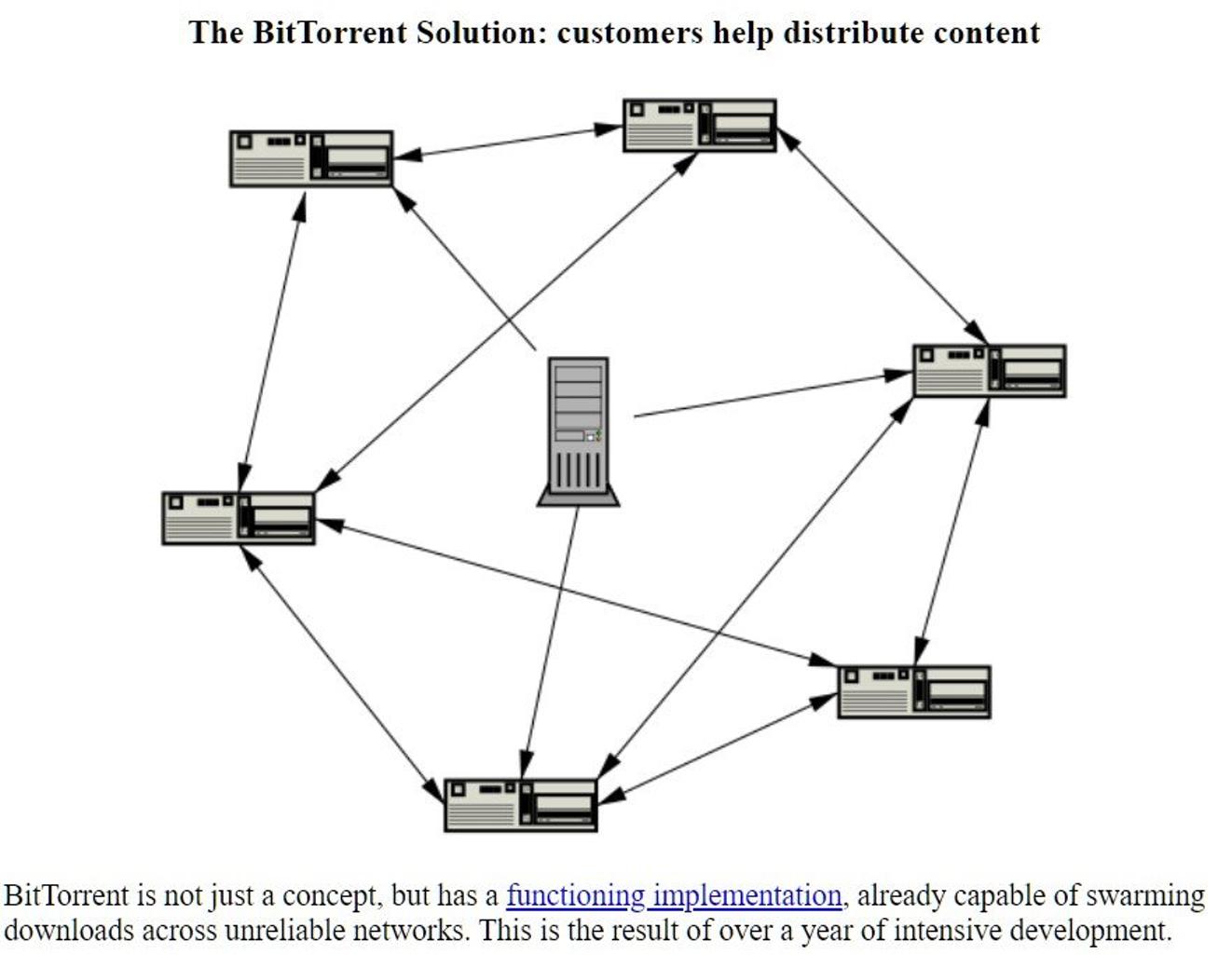
这种去中心化的特性在当时是全新的概念,因为绝大多数文件共享使用的仍是中心化的架构,所以 BitTorrent 推出后不久就获得了大量开发者的关注(据说当时 Bram Cohen 收集了一些免费的色情电影来吸引更多的人测试他的程序)。其在 Linux 用户群体中也产生了很大的反响,因为他们有许多开源的程序、系统镜像文件需要共享。
就在 BitTorrent 公开发布数个月后,第一批 Torrent(种子)网站诞生了。这些网站包括 Suprnova.org、Donkax.com、Bytemonsoon.com 和 Torrentse.cx。它们允许用户上传和分享音乐、照片、软件,甚至电影。要知道,在当时的互联网上向广大用户提供这些类型(通常是盗版)的文件在是不可能的,因为带宽和存储成本非常高。但有了 BitTorrent,这些网站只需要托管体积很小的 .torrent 文件即可,文件共享的游戏规则也自此正式被改变。
可以看到,BitTorrent 早期成功的原因之一是大幅节省了带宽成本,这使得快速共享大文件成为可能。这在今天听起来可能微不足道,但在拨号时代,也就是 YouTube 出现的几年前,这无疑是一场革命。再回到 Bram Cohen 在2001年7月初次宣布 BitTorrent 时的消息,当时那篇公告只有一个人回复,他向 Bram Cohen 提问什么是 BitTorrent,不过 Bram Cohen 没有回答。前些日子炒得火热的硬盘挖矿也有 Bram Cohen 的一份 “功劳”,因为 Chia 币正是由 Bram Cohen 成立的加密货币初创公司发行。从这方面来看,Bram Cohen 的初心或许是成为一名 “硬盘杀手”。
1、Transmission
以Debian的默认BT客户端Transmission来作为对比的基准。它速度相当快并且比较强大,但是它的功能相对简陋,没有诸如网络浏览器,也不支持无种子文件分享模式。如果您不需要这些功能的话,Transmission已足够胜任BT工作。Transmission是一种BitTorrent客户端,特点是一个跨平台的后端和其上的简洁的用户界面。Transmission以MIT许可证和GNU通用公共许可证双许可证授权,因此是一款自由软件。
Transmission is a simple BitTorrent client. It features a very simple, intuitive interface (gui and command-line) on top on an efficient, cross-platform back-end.
This package installs both CLI and GUI versions of transmission.
Homepage: http://www.transmissionbt.com/
2、CTorrent简介
CTorrent 是用C语言写的一个BT客户端。现在可以运行在多种Linux 版本、MacOS 和 FreeBSD下,以后可能也会运行在Windows下。CTorrent是运行在命令行模式下的,这意味着它不需要任何图形组件(如X Server)。你可以通过远程访问来让它在后台运行。
This application is written in the C++ language and doesn't require any graphical component, such as an X server. Original ctorrent's upstream has stopped its development and now it's kept updated with new releases/bug fixes by a new developer.
It's built as a console program and it can be even used remotely in a machine that provides outside ssh access. Other main features are:
* Support for large files (>2GB) and large torrents (>255 files).
* Strategic selection of pieces to request for download.
* Continuous queueing of download requests, tuned based on latency and throughput for each peer.
* Improved download performance, including parallel requests in initial and endgame modes.
* Improved bandwidth regulation.
* Improved compatibility with other peers.
* Performance optimization and bug fixes.
* An interface for monitoring and managing multiple clients.
* Dynamic cache allocation and management, including prefetch.
Homepage: http://www.rahul.net/dholmes/ctorrent/
3、rTorrent
rtorrent是利用libtorrent库创建的Ncurses客户端程序。使用C++语言编写的rtorrent除了能够提供基于GUI界面的客户端所具备的功能之外,其速度和效率更为用户所推崇。
主要功能包括:
查看下载、开始下载、停止已激活的下载或删除已经停止的下载等;
调用命令或更改设置;
更改下载的优先级;
通过URL或文件路径添加种子,使用标签查看目录内容并自动完成;
查看日志;
按空格键退出。
ncurses BitTorrent client based on LibTorrent from rakshasa rtorrent is a BitTorrent client based on LibTorrent. It uses ncurses and aims to be a lean, yet powerful BitTorrent client, with features similar to the most complex graphical clients.
Since it is a terminal application, it can be used with the "screen"/"dtach" utility so that the user can conveniently logout from the system while keeping the file transfers active.
Homepage: http://libtorrent.rakshasa.no/
4、qBitTorrent
是Ubuntu Linux中最受欢迎的P2P软件之一。出自一名法国大学生之手的qBitTorrent功能强大,界面精美,操作直观。
qBittorrent的主要特性包括:
使用Qt4工具包编写出优美的图形用户界面;
支持UPnP/NAT-PMP端口转发;
支持加密(与Azureus兼容);
支持多个文件同时下载或上传;
集成搜索引擎;
支持DHT网络;
支持μTorrent对等交换(PeX);
支持多达25种语言。
bittorrent client based on libtorrent-rasterbar with a Qt4 GUI BitTorrent client written in C++ and based on libtorrent-rasterbar with a Qt4 user interface. qBittorrent is a feature rich but lightweight client that is very similar to uTorrent.Its main features are:
* Polished uTorrent-like user interface
* Well integrated and extensible search engine
* Remote control through a Web user interface
* Vuze-compatible protocol encryption
* uTorrent-compatible Peer eXchange (PeX)
* DHT (trackerless) support
* UPnP / NAT-PMP port forwarding
* IPv6 compliant
* RSS support with advanced download filters
* Advanced control over torrent content and trackers
* IP Filtering (eMule / Peer Guardian filters)
* Torrents queueing and prioritizing
* Good localization (~25 languages supported)
* Unicode support
Homepage: http://www.qbittorrent.org/
5、kTorrent
是使用C++语言为KDE编写的BT客户端程序,其主要功能包括:
支持UDP追踪;
IP地址黑名单插件;
UPnP端口转发(通用即插即用);
协议加密;
支持μTorrent对等交换;
文件优先级别设置;
导入已部分下载的文件;
目录扫描,自动监视新的种子文件目录;
支持RSS。
BitTorrent client based on the KDE platform, This package contains KTorrent, a BitTorrent peer-to-peer network client, that, is based on the KDE platform. Obviously, KTorrent supports such basic features as downloading, uploading and seeding files on the BitTorrent network. However, lots of other additional features and intuitive GUI should make KTorrent a good choice for everyone. Some features are available as plugins hence you should make sure you have the ones you need enabled.
- Support for HTTP and UDP trackers, trackerless DHT (mainline) and webseeds.
- Alternative UI support including Web interface and Plasma widget.
- Torrent grouping, speed capping, various download prioritization capabilities on both torrent and file level as well as bandwidth scheduling.
- Support for fetching torrent files from many sources including any local file or remote URL, RSS feeds (with filtering) or actively monitored directory etc.
- Integrated and customizable torrent search on the Web.
- Various security features like IP blocking and protocol encryption.
- Disk space preallocation to reduce fragmentation.
- uTorrent compatible peer exchange.
- Autoconfiguration for LANs like Zeroconf extension and port forwarding via uPnP.
- Scripting support via Kross and interprocess control via DBus interface.
- SOCKSv4 and SOCKSv5 proxy, IPv6 support.
- Lots of other useful built-in features and plugins.
Homepage: http://ktorrent.org/
6、Azureus
很多Windows用户都知道,以快速高效著称的Azureus是一个基于JAVA的BT客户端软件。其实,Azureus还是一个跨平台的BT下载工具,在Linux操作系统上的应用同样受到了开源社区的青睐。 Azureus-Java BitTorrent客户端,它用Java语言实现了BitTorrent协议。以下列出它的一些特点:
支持多个torrent同时下载
可对每一个 torrent的上传和下载速度进行限制
可调整硬盘缓存
对所有的torrent只使用一个端口
支持多种语言(包括中文)等其它功能。
Azureus是Linux下超强的BT下载软件,占用资源少功能强大!但对于国内的服务器连接速度不快,一旦连接成功速度非常快能达到该网最快速度,同时加入了irc聊天室,增加了一些基本的irc命令,可以看见在线人数和ID,支持多tracker url,对于多tracker发布的torrent可自动切换,并可以手动更改tracker url。
Azureus offers multiple torrent downloads, queuing/priority systems (on torrents and files), start/stop seeding options and instant access to numerous pieces of information about your torrents. Azureus now features an embedded tracker easily set up and ready to use.
Homepage: http://azureus.sourceforge.net
7、Deluge
和Azureus一样,不仅仅适用于Linux平台,也适用于其他主流操作系统。其功能同样十分强大,包括:
Web用户界面;
BitTorrent协议加密;
Mainline DHT;
本地对等发现;
FAST协议扩展;
μTorrent对等交换;
UPn与NAT-PMP
支持代理服务器;
全局或单种子速度限制;
密码保护;
RSS。
Deluge is a full-featured, multi-platform, multi-interface BitTorrent client.
It uses libtorrent-rasterbar in it's backend and features multiple user-interfaces including: GTK+, web and console.
It has been designed using the client server model with a daemon process that handles all the bittorrent activity. The Deluge daemon (deluged) is able to run on headless machines with the user-interfaces being able to connect remotely from any platform.
This package will install the GTK+ user interface and the 'deluge' command, which enables launching any user-interface or setting your default one.
Homepage: http://www.deluge-torrent.org/
8、bittornado
BitTornado is a bittorrent client built on the original BitTorrent client from BitTorrent Inc. This client features a console and curses mode, lots of features, and is one of the original bittorrent clients created.
Features include:
* upload/download speed limitation
* prioritised downloading when downloading batches (several files)
* detailed information about connections to other peers
* encryption (PE/MSE) support (with the recommended python-crypto)
* console mode for running from scripts
* curses mode for running interactively
* tracker for the distribution of files
This package contains the console and curses interfaces, and a bittorrent tracker, install the package bittornado-gui to get the GUI components. See the bittorrent package for a description of what bittorrent is.
Homepage: http://bittornado.com
9、bitstormlite
BitTorrent Client based on C++/Gtk+2.0,This application based on the C++ language integrated with a Gtk+2.0 user-friendly gui has a great feature, which is the possibility to download a huge amount of data from any .torrent file taken from trackers around the web.
Homepage: http://sourceforge.net/projects/bbom/
10、bittorrent
BitTorrent is a tool for distributing files. It's extremely easy to use - downloads are started by clicking on hyperlinks.
Whenever more than one person is downloading at once they send pieces of the file(s) to each other, thus relieving the central server's bandwidth burden. Even with many simultaneous downloads, the upload burden on the central server remains quite small, since each new downloader introduces new upload capacity.
This package contains the tools which are used for console-only downloading. If you want the GUI interface, install the bittorrent-gui package.
Homepage: http://bitconjurer.org/BitTorrent/
11、Flush
Flush is a GTK-based BitTorrent client. You can use it to download files from the BitTorrent network.
Features:
* Controlling running instance by command line interface.
* Running many instances with different configs from the same user.
* Automatic copying finished downloads to specified directory.
* Setting custom download path for each file of the torrent.
* Ability to choose torrent file's character set encoding.
* Automatic torrents loading from specified directory.
* Automatic pausing and removing old torrents.
* Temporary pausing and resuming torrents.
* Overall and current session statistics.
* Creating your own torrent files.
* IP filter.
Flush uses Rasterbar's version of libtorrent.
Homepage: http://sourceforge.net/projects/flush
12、mldonkey-server
MLDonkey is a door to the 'donkey' network, a decentralized network used to exchange big files on the Internet. It is written in a wonderful language, called Objective-Caml, and present most features of the basic Windows donkey client, plus some more:
- works on UNIX-compatible platforms.
- remote control by telnet, WEB browser or GTK+ interface.
- access to EDonkey (edonkey2000, overnet, emule)
- access to Gnutella1/2
- access to Bittorrent
Homepage: http://mldonkey.sourceforge.net/